Protecting a Website from Bot Scanning
 NetRunner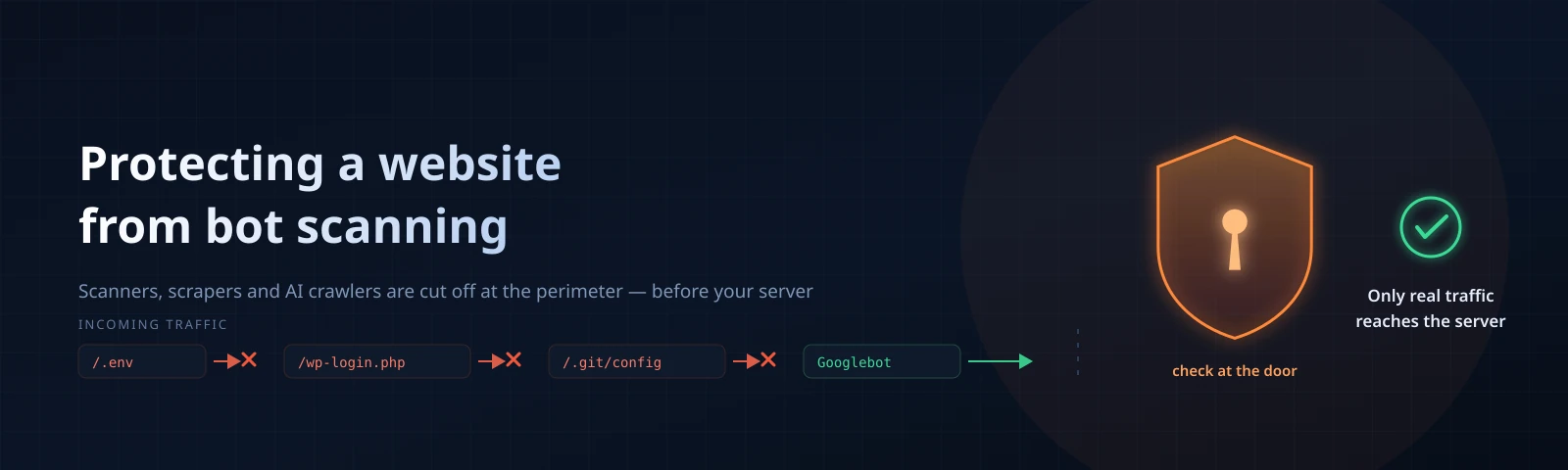
You open access.log — and there it is, the knocking. Regular. Brainless. Mechanical, like
a woodpecker running on numerical control.
/wp-login.php. /.env. /.git/config. /phpmyadmin/.
The site, incidentally, is built on Hugo. WordPress has never lived here. Not for one single day.
And yet they keep knocking. Forty seconds pass — and there it is again. Day and night. No lunch breaks, no weekends, no conscience.
And no. This is no break-in.
This is an inventory. A stroll through with a notepad: so, what have you got here worth taking?
The regular knock at the door
Scanning is the internet’s background noise, like the hum of a refrigerator: until you truly listen for it, it isn’t quite there.
Your domain flickered through the CT logs the moment a certificate was issued. Then it showed up in passive DNS. Then somebody pointed Shodan at your address range — and that’s it, you’re on the list.
Nobody singled you out personally, don’t flatter yourself. A combine harvester is simply rolling along the whole address range, rattling every doorknob in turn. Your door is the third on the left. No better than your neighbour’s.
Go and look at your own logs, right this moment. Seriously, give it a minute:
grep -aoE '"(GET|POST) [^ ]+' /var/log/nginx/access.log | sort | uniq -c | sort -rn | head -30
I’d wager something from this gentleman’s kit floats up to the top:
/.env,/.git/config,/config.json— secrets somebody carelessly left exposed to the outside. A classic;/wp-login.php,/xmlrpc.php,/wp-admin/— the everlasting WordPress hunt. Even if you don’t have it and never did;/phpmyadmin/,/adminer.php— little panels left behind back in 2014. The bots, unlike you, still remember them. Every one;/backup.sql,/dump.sql.gz,/site.zip— what if the database dump is still lying in the web root? Well, what if?/actuator/env,/api/v1/pods— Spring and Kubernetes. The fashion never goes out of style;- plus the never-ending grind through
/admin,/manager,/cgi-bin/with every imaginable suffix.
And running alongside is a second layer. A nastier one.
Scrapers methodically drain your product catalogue — the lot, down to the very last item page.
Password-guessers hammer the login form: five passwords per second, from three hundred addresses, all at once.
AI crawlers carry off the texts you paid a real author to write.
Click farms pump up behavioural metrics and burn through your ad budget.
Everybody is having fun. Except you.
The frightening one isn’t whoever found a hole. The frightening one is whoever keeps looking for it, continuously, for free, and without tiring. They will find it eventually.
Who exactly are we catching
“Bot” is far too vague a word, like “animal” at a zoo. Each kind needs catching in its own way, and mixing up the categories costs you dearly: swat the wrong ones and tomorrow your site quietly slips out of search.
Meet them, one by one, by name:
- Vulnerability scanners — grinding through paths, hunting for admin panels,
.env, exploit URLs. What it costs you: logs crammed with junk, and a hole once found is already a disaster. Cured by a filter in front of the server; - Password-guessers — hammering
/loginwith dictionaries. Stolen accounts, a database brought to its knees. Cured by rate limits and checks; - Content scrapers — pulling down the whole catalogue and every article. Content theft plus a bandwidth bill. Screened at the door;
- AI crawlers — harvesting texts to train models. Your content drives off into somebody else’s model. Switched off in the known-bots list;
- SEO crawlers — building link maps for competitors. Server load, your site’s structure leaked. Switched off in the known-bots list;
- Fraud farms — cloned browsers from hundreds of addresses. Ad click fraud, skewed analytics. Handed to the protection layer;
- Search engines — they index. Meaning they work for you. Nothing about them needs fixing. Do not touch them, let them pass. Always.
That last line is the important one, in case it slipped past.
Half the “we switched protection on and lost our traffic” stories begin exactly there: Googlebot was sent to a captcha. It took offence. And it never came back.
robots.txt is not a fence
robots.txt is a polite request. A request, to be precise — not a rule, not a fence, not a barrier.
Search engines honour it, because looking good pays off for them. A vulnerability scanner, on the other hand, feels about your politeness… let’s put it this way: it could not care less.
Worse still. A file like this:
User-agent: *Disallow: /admin-panel-2019/Disallow: /backup/Disallow: /internal-api/
…is not protection. It’s a map. Directions to the interesting parts, drawn in your own hand.
Thank you, says the bot, how very kind — and walks straight down those addresses.
The rule, in short: put in robots.txt only what you wouldn’t mind showing to any passer-by.
Everything else gets closed off with access controls. Polite requests don’t close off things like
that. Ever.
Three places you can put the filter
- In the application — captchas in forms, honeypot fields. Upside: it knows the context of the action. Downside: the request has already made it to your code, your database and your disk;
- On the server — nginx
limit_req, fail2ban, a WAF. Full control, free of charge. But it only sees its own IP, and against a distributed attack it’s almost useless; - At the perimeter, in front of the server — a proxy with a browser check. The junk never gets to origin. The trade-off: traffic flows through a middleman, so you need one you trust.
The server layer, by the way, is not to be sniffed at — it works, and it works honestly.
The minimum gentleman’s kit for nginx looks like this: cap the rate of requests against the login form.
limit_req_zone $binary_remote_addr zone=login:10m rate=5r/m;

location = /login {
    limit_req zone=login burst=3 nodelay;
    proxy_pass http://backend;
}
And on top of that, fail2ban, so the especially stubborn characters get banned right at the kernel level. For good. Well, for a day to begin with:
[nginx-scan]
enabled  = true
port     = http,https
filter   = nginx-scan
logpath  = /var/log/nginx/access.log
maxretry = 6
findtime = 120
bantime  = 86400
bantime 86400 is a day, in case you were wondering. In seconds, yes.
Does it work? Of course it works.
Right up until the day those same requests come in from four thousand addresses — one or two from each. Every one of them quiet. Every one below any threshold you care to set, however far down you drag it.
And the server is down on the floor. And you’re standing over it, bewildered.
That is where the server layer ends. And the perimeter begins.
We’ll go through it using WebShield as the example: the domain moves onto their NS, traffic flows through their proxy, and the server receives only what has already been sieved. The site’s code stays untouched. Not a single line. Zero edits.
Connection to WebShield
Step 1. Pointing the domain to their NS
Sign up, open Domains → Add domain, and type in the bare name — no https://, no paths: just
example.com.
Then over to your registrar, and switch the NS records to nsbox.webshield.pro and
nshub.webshield.pro.
Remove the old NS records. Entirely. Every last one.
Keep one “just in case” and you’ll earn the classic “it works every other time”: half the resolvers dutifully route around your protection. Around it, yes. That kind of surprise.
The update usually propagates within 10–60 minutes. Sometimes it stretches out to 48 hours. There’s no hurrying it along — DNS lives its own life, don’t ask.
Check from the terminal with dig +short NS example.com, or, if you’d like to see it through
Google’s own eyes, dig +short NS example.com @8.8.8.8.
Once the nsbox/nshub pair shows up in the answer, press Check in the dashboard. The status
should change to Delegated. Should, though not always straight away: DNS, as we’ve established,
thinks slowly.
Step 2. Records and the Proxy toggle
In the DNS section, add the usual records: A or AAAA for @, CNAME for www. If mail
lives on the domain, add MX and TXT.
Supported types are A, AAAA, CNAME, MX, TXT, SRV, CAA; SOA and NS are system
records and can’t be edited by hand.
And now — the single most important move in this entire article. On A, AAAA and CNAME records
there’s a Proxy toggle.
One click, and visitor requests no longer travel straight to you but through WebShield’s nodes — with caching, WAF and filtering.
Service records (MX, TXT, SRV, CAA) are never proxied, and thank heavens: mail has no use
for a proxy.
Next comes Hosts, and that’s where you tune the behaviour of a specific name:
- Host mode — proxying, or a 301 redirect to a different host. Handy for
wwwwhen the site lives on the apex; - SSL required and Redirect HTTP to HTTPS — the certificate is issued and renewed automatically, for free, subdomains included;
- HTTP/2 and HTTP/3 — for client connections. The browser picks HTTP/3 up from the
Alt-Svcheader on the next request; if the visitor’s network blocks UDP, no harm done, they quietly stay on HTTP/2; - Protocol to your server — the “WebShield → origin” leg. Leave it on Automatic. Seriously, leave it.
On that last one, briefly and to the point. Force HTTP/2 at a server that doesn’t speak it and you get a 502. Across the entire site. With no rollback. None whatsoever.
When in doubt, don’t touch it. Like the manual for an electrical appliance, honestly.
Step 3. Hide the origin
The most galling mistake — and the most common one: protection is on, the dashboards are glowing, lovely, and the attack sails straight past. Directly at the server’s IP.
Why? Because that IP is still sticking out in plain sight, like an antenna.
Check three things. Three, no more than that:
- no DNS records left pointing at the real address. Old subdomains,
mail.,ftp.,old.,dev.and other greetings from the past — clear every one of them out; - has the IP already been exposed anywhere? DNS history, for your information, is kept for years. Change the IP at your hosting provider, don’t be shy;
- on the server, close 80 and 443 to everyone except WebShield’s nodes. Everyone. Except them.
With ufw it looks like this:
ufw default deny incomingufw allow 22/tcpufw allow from <WebShield-node-address> to any port 443 proto tcpufw enable
Take the current node address list from the dashboard or from support. There’s nothing to guess at here; you’ll only end up arguing with your firewall over nothing.
Step 4. Browser check: Off, Browser or Captcha
This is the core of anti-scanning protection, the heart of the entire enterprise.
The level is chosen for each host: in Hosts for a proxied site, in the site’s card under Sites for static hosting. There are three modes in total:
- Off — no extra checks, basic filtering stays in place. The default, for quiet sites;
- Browser — suspicious clients get put through a browser check. The working choice for most people, take this one;
- Captcha — a check with a captcha, stricter. Mutually exclusive with Browser. This is the mode for an active attack, a flood of scrapers, click fraud.
The browser check is a quick automatic test at the door.
A real person usually doesn’t even notice it: the page opened by itself, nothing needed clicking, off we go. An automated client that is only pretending to be a browser, though, fails the test — and never gets to the server.
What exactly gets checked, and how, is not something you need to know. Neither do you. And certainly not whoever runs into that screen. Let them guess.
Malicious-request filtering, meanwhile, runs constantly, whatever you pick with that switch: injections, service files, exploit paths — all of it is cut off even on Off.
A scanner yanking at /.env gets bounced in any mode. No exceptions.
How do you know it’s time to tighten up? Simple: regular spikes on the “Attacks over time” chart, or the “Direct hits on the check” card creeping upward — that’s it, switch the captcha on. That’s what it’s there for.
Step 5. Exceptions — surgically, one at a time
The browser check breaks everything that can’t be a browser: websockets, API calls, mobile and server-side SDKs. The check is of no use to them — they’re already on your side.
For those, the host settings have exceptions. One per line, along these lines: /robots.txt,
/sitemap*.xml, /api/*, /ws.
The rules are strict. And that, oddly enough, is for the better:
- no more than 50 entries;
- each one starts with
/— strictly; - the root
/can’t be specified. Otherwise the whole point is lost entirely, it truly is; ..is forbidden;- up to 200 characters: letters, digits and
/,_,.,-,*; - the asterisk
*works as a mask at the end of a segment. There only.
An exception removes the check screen. And only that. Malicious-request filtering, rate limits and bans keep working on those paths exactly as before.
Even so — don’t put login forms, the admin panel or sections holding user data into exceptions. The temptation is strong, sure. The cost of getting it wrong is stronger.
Step 6. Known bots: who gets in, and who gets a 403
A separate layer. And my favourite one, honestly.
WebShield recognises known bots by sight and lets you decide about each one individually — right on the host, in the Known bots block. All are allowed by default. Checkbox ticked, we let them through. Unticked, it’s a 403 — and not just anywhere, but out at the edge, before your server.
They’re divided into groups, like so:
- AI training crawlers — GPTBot, ClaudeBot and anthropic-ai, CCBot, Bytespider, Amazonbot, Meta-ExternalAgent, Cohere, Diffbot. And the company;
- AI search crawlers — OAI-SearchBot, PerplexityBot;
- AI assistants — ChatGPT-User, Claude-User, Perplexity-User, DuckAssistBot. These fetch a page because a living human asked for it in a chat — helping them out even feels rather nice;
- Search engines — Googlebot, Bingbot, YandexBot, Applebot, DuckDuckBot and the rest;
- Social networks and messengers — link previews: Telegram, VK, X, LinkedIn, WhatsApp, Discord;
- SEO and analysis — AhrefsBot, SemrushBot, MJ12bot, DotBot, DataForSeoBot;
- Monitoring — UptimeRobot, Pingdom, StatusCake, Site24x7.
A typical setup for a content project: untick both AI groups entirely and leave the search engines alone.
Indexing carries on, and the texts don’t drive off to be trained on.
Assistants are your call: behind each of them sits a living person, and they’re reading about you right now. Or they asked about you — which is also rather nice.
Link vendors and competitors’ crawlers (AhrefsBot, SemrushBot, MJ12bot) get shut out on pure
economics: they know how to drain a site. Very diligently, credit where it’s due.
The result shows up in the statistics with the naked eye: on the “Visitors” tab, on the “Humans and bots” chart, the layer for the blocked category collapses within a day or two. And traffic to origin drops by exactly its share. Arithmetic, that.
This layer is built for bots that identify themselves honestly. Big companies don’t play games about that — blocking applies to them reliably.
A disguised scraper, by contrast, won’t be cut off by this list: other mechanisms handle those. The layers don’t replace one another — they stack. Like blankets in winter.
And separately, to prevent confusion: Google-Extended and Applebot-Extended are not bots from
that list. They are directives for robots.txt, written into the file like this:
User-agent: Google-Extended and, below it, Disallow: /.
Step 7. The script on your site — seeing without showing a screen
Not everyone is willing to show visitors a check. And I get it: an online store, every second counts, and an extra screen between the ad and the shopping cart isn’t an “overhead”, it’s a direct loss. Money down the drain.
The compromise they came up with is elegant — a script on your pages:
<script src="/webshieldpro/t.js" async></script>.
No keys. No settings. It’s served from your own domain, so no third party enters the chain.
Why it exists: some visitor signals are only visible from inside the page, and without the script that zone stays blind. With it, the real picture emerges in the statistics: how much traffic comes from farms and automated browsers. Not “how many visits there were”, but who they actually were.
And here is what it does not do. This needs to be clear, with no illusions:
- it blocks nothing. It merely supplies data the protection uses to make decisions;
- it does not replace the browser check: that one denies entry, this one merely makes things visible;
- it has no API — you can’t reach it from your own code, so don’t even try;
- it’s no use at all for decisions about forms. There’s a separate tool for that, covered below.
What it collects: technical characteristics of the environment and anonymised counters. What it does not collect: field contents, typed text, passwords, page contents, browsing history. None of that.
Do reflect the fact that visitor data gets processed technically in your privacy policy, though — that’s your area of responsibility, and nobody is going to cover for you there.
Step 8. Forms: a separate problem, a separate tool
Sign-ups, enquiries, promo codes, logins — all of this is about trusting one specific action, not traffic in general.
The tool is a separate one: Form protection. In the dashboard you create a project, receive
a key, put a tag in <head> and list your forms by selector:
<script src="https://af.webshield.pro/t/v1.js?k=YOUR_KEY" data-forms="#signup, #contact_form" async></script>
And that’s it, away you go.
From then on, before accepting a submission, your backend asks for a score by session identifier and receives a verdict with reasons.
Your code applies the decision — physically there is no way to stop a request from outside the traffic path, and the documentation says so honestly, without embellishment.
The domain, incidentally, doesn’t have to be moved to WebShield at all: forms are protected separately. Convenient if a migration isn’t on the cards just yet.
Let’s see what we got
After a day, open Statistics. That’s where all the interesting stuff is, I promise.
The “Protection” tab. Attacks repelled, IPs blocked, fake search bots, browser checks shown, direct hits on the check, suspicious ad clicks. A green zero in the first card is good. Excellent, even.
The “Bans” tab. A live list of everyone the system is currently holding. Without trial or investigation, but with a reason:
- Blocked requests — how many got cut off over the period;
- Still knocking — the bot hasn’t given up and keeps trying. Persistent;
- Action — refusal at the edge, or being sent to the check;
- Reason — scanner, error spike, login brute force, bot farm;
- Expires — when the current block gets lifted.
A line reading “scanner · Still knocking · 14,302 requests” reconciles you with life better than any advertisement. Honestly.
There they are — fourteen thousand-odd requests that no longer reached your PHP. And never will.
The “Visitors” tab. The “Humans and bots” chart, layered by category: humans, search engines, AI bots, social networks, SEO, monitoring, scanners.
Unique visitors here means confirmed live browsers, so the figure is noticeably lower than in Yandex Metrica. And, frankly, noticeably closer to the truth. Metrica counts everybody, vacuum cleaners included.
The “Site health” tab → “Search engines”. A table with crawl status: 🟢 crawling without problems, 🟡 there are errors, 🔴 running into the protection, grey — hasn’t visited in a long time.
Look in here after every tightening of the settings. See red next to Yandex or Google — don’t think twice: ease the mode or add exceptions. Immediately.
And a quick check by hand while the tab is open: curl -sI https://example.com/robots.txt | head -1,
and the same for https://example.com/sitemap.xml.
Both should return 200. Got the check screen instead — congratulations, you’ve just closed your
sitemap off from the search engines. A genre classic, sadly.
What stays on your side
The perimeter doesn’t cancel hygiene, that’s the thing. No proxy, however fancy, will save you from
an admin panel with the password admin123. Not one:
- CMS, plugin and theme updates — on a schedule, not “whenever we remember”. We usually remember right after the break-in;
.env,.git, database dumps — outside the web root. Always. Even “for five minutes”. Especially for five minutes;- two-factor on the admin panel, and the admin panel itself not at
/admin, I beg you; - a honeypot field in forms: hidden, invisible to a human. Filled in means the sender is a bot, simple as that;
- minimal file permissions, a separate user for the application;
- backups that somebody has actually tried restoring at least once. Not “we make them”, but specifically “we’ve tried restoring them”.
What the protection doesn’t do
The section that usually doesn’t make it into the marketing brochures. Which is a shame. Here it is:
- It doesn’t catch 100% of malicious traffic. And don’t promise yourself it will. No system in the world does. The goal is more modest: strip away the bulk of it and raise the cost of an attack enough that it stops being interesting;
- It doesn’t parse the contents of submissions. Manual spam, written by a living person, gets through. Well, what did you expect — they really are a person;
- It doesn’t affect rankings. It reduces the bot load that skews your metrics. What Yandex or Google make of it in their results is their business; there are no guarantees on positions and there can’t be;
- It doesn’t refund click fraud. It identifies suspicious clicks and gives you an export of IPs and timestamps as evidence. The refund is processed by the ad network, and the decision is theirs;
- It doesn’t fix a hole in your code. The perimeter cuts down the number of attempts, but the vulnerability isn’t going anywhere. See the section above — that’s what it’s there for.
Checklist
Run your eye over this before closing the tab. Everything ticked means you can sleep soundly:
- the domain is delegated,
dig +short NSshowsnsbox/nshub, no old NS records left — not a single one; Proxyis on for all of the site’sA,AAAAandCNAMErecords;- the server’s real IP isn’t sticking out anywhere, ports 80/443 are open only to the protection nodes;
Bot protectionis inBrowsermode. At minimum;- exceptions are set surgically:
/robots.txt,/sitemap*.xml, API, websockets. The root — untouched; - AI crawlers and surplus SEO bots are unticked, search engines are allowed;
robots.txtandsitemap.xmlreturn200with no check screen;- “Site health → Search engines” — green for Yandex and Google;
- a day later, the “Bans” tab shows who the system is holding and why. And that’s a pleasant sight.
Your logs will never fall completely silent, don’t dream of it — the knocking never stops. But from now on they’ll be knocking at somebody else’s door. One a block away.